Help Center
How to activate a license
You may be asked to activate the application you have just installed. Otherwise, use of the application will be restricted.
Show license window
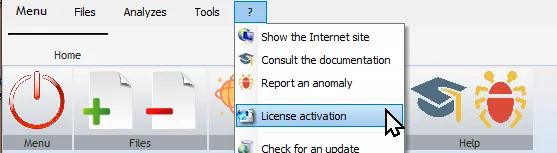
To activate the application, display the license management window (menu “?” / option “License activation”)
Enter your license activation key
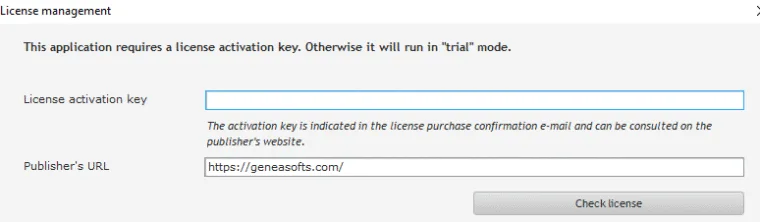
In the window , enter the license activation key you received by e-mail in the “License activation key” field.
Remarque
Licenses and their activation keys can also be viewed in your purchase history.
Check your license activation key
Once you’ve entered the activation key, click on the “Check license” button.
Your license information will appear:
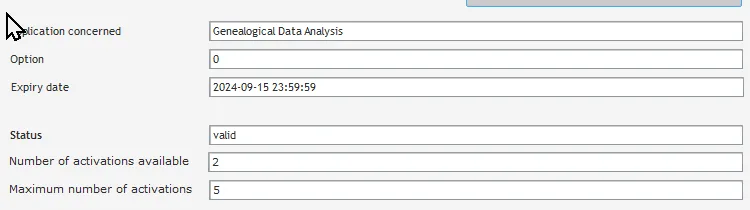
Possible values for the “Status” field :
| Status” field values | Explanation | Possible actions |
| active | Your license is already active. | You can deactivate the license on this computer. |
| desactivated | Your license is deactivated. | You can activate the license on this computer. |
| disabled | Your license has been deactivated (not to be confused with inactive). | Contact technical support. |
| expired | Your license has expired | You will need to renew your license before you can activate it on a computer. |
| failed | The action was unsuccessful (e.g. deactivate a previously deactivated license) | |
| invalid | The activation key is incorrect or does not correspond to this application. | Check and correct the key entered. |
| site_inactive | The activation key entered is valid. But the license is not activated on this computer. | You can activate it if you still have possible activations. |
| valid | The activation key entered is valid. | You can activate the license on this computer. |
Please note
- The “expiration date” field indicates “lifetime” (if the license is perpetual) or an end date for the license’s validity.
- Licenses may have a limited number of possible activations, for example on a maximum of two computers. If this limit is reached, you can no longer activate the license on another computer. You can, however, deactivate a license on one computer. A deactivated license can be reactivated on the same or another computer.
Activate your license :
If the activation key indicated is valid, click on the button [activate the license].

The “Status” field should read “active”.
Astuce
You must restart the app to use the features included in the downloaded update.