Help Center
Options – “Analyses” tab
Cet onglet regroupe les options qui concernent les analyses réalisées sur les fichiers GEDCOM suivis par l’application.
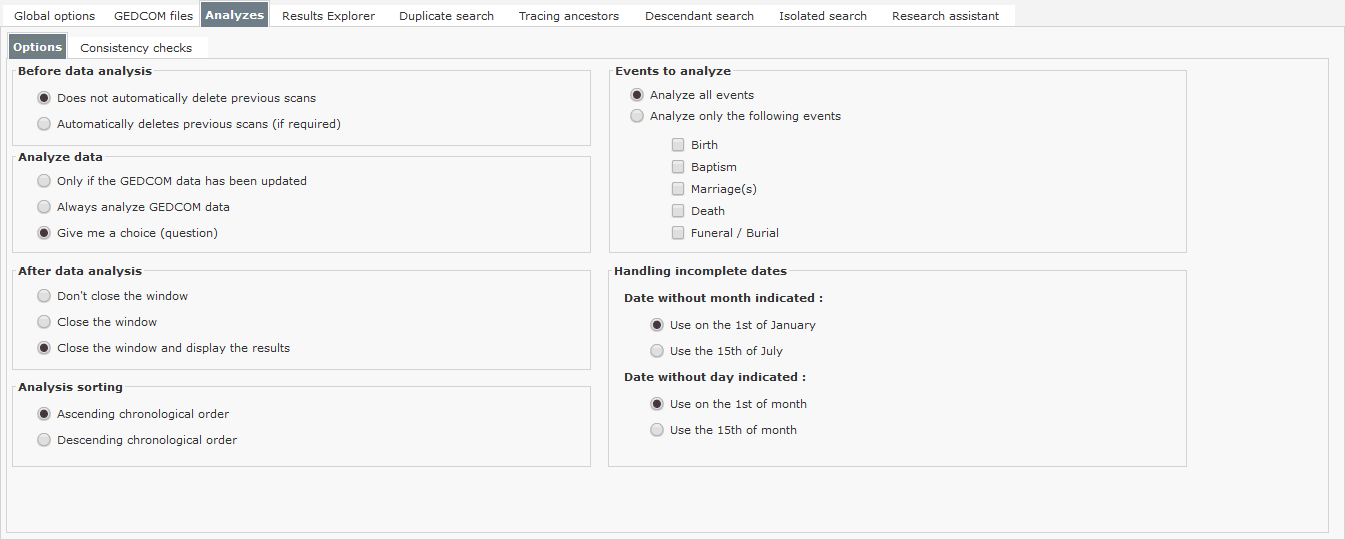
This tab contains 2 sub-tabs:
“Options” sub-tab,
“Consistency checks” sub-tab.
Options sub-tab
This sub-tab contains options for modifying the application’s behavior during data analysis.
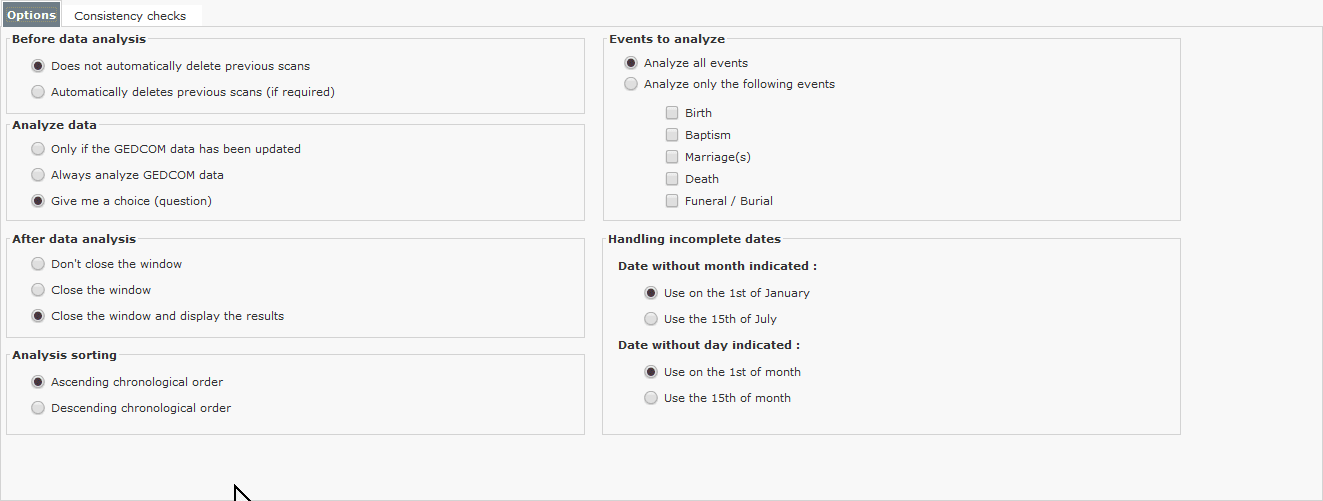
| Option | Possible values | Effects |
| Before data analysis | Does not automatically delete previous analyses | If the maximum number of analyses has been reached, the application will not be able to perform the new analysis. On the other hand, old analyses will not be deleted automatically. You can delete them manually. |
| Automatically deletes previous scans (if required) | If the maximum number of analyses has been reached, the application will delete as many previous analyses as necessary and add the new analysis. | |
| Analyze data | Only if GEDCOM data has been updated | The analysis will only be performed if the data contained in the GEDCOM file has been modified. |
| Always analyze GEDCOM data | The analysis will be performed in all cases. This may lead to a repeat of the previous analysis, since the data has not been modified. | |
| After data analysis | Do not close the window | The application will not close the analysis window at the end of the analysis. |
| Close window | The application will close the analysis window at the end of the analysis. The list of tracked GEDCOM files will be displayed. | |
| Close window and display results | The application will close the analysis window at the end of the analysis, and the window of analyses performed on the GEDCOM file will be displayed. | |
| Sorting analyzes | Ascending chronological order | Displays the list of analyses from oldest to most recent. |
| Descending chronological order | Displays the list of analyses from the most recent to the oldest. | |
| Events to analyze | Analyze all events | All events (births, christenings, marriages, deaths, funerals, etc.) are analyzed. |
Analyze only the following events:
| Only checked events are analyzed. This option reduces analysis time. Data from non-analyzed events cannot be displayed in the explorer. | |
| Handling incomplete dates | Date without month indicated | Select whether the application will use January 1st or July 15th when the date does not contain a date range. |
| Date with no day indicated | Select whether the application will use the 1st or the 15th of the month when the date does not contain a month. |
The “Consistency checks” sub-tab
This sub-tab contains options for modifying the application’s behavior during data consistency checks.
Note
Consistency checks are carried out on data whose values have been previously considered valid (and not necessarily exact). For example, the application will only check the consistency of age at marriage if the date of birth and the date of marriage are indicated in a valid form
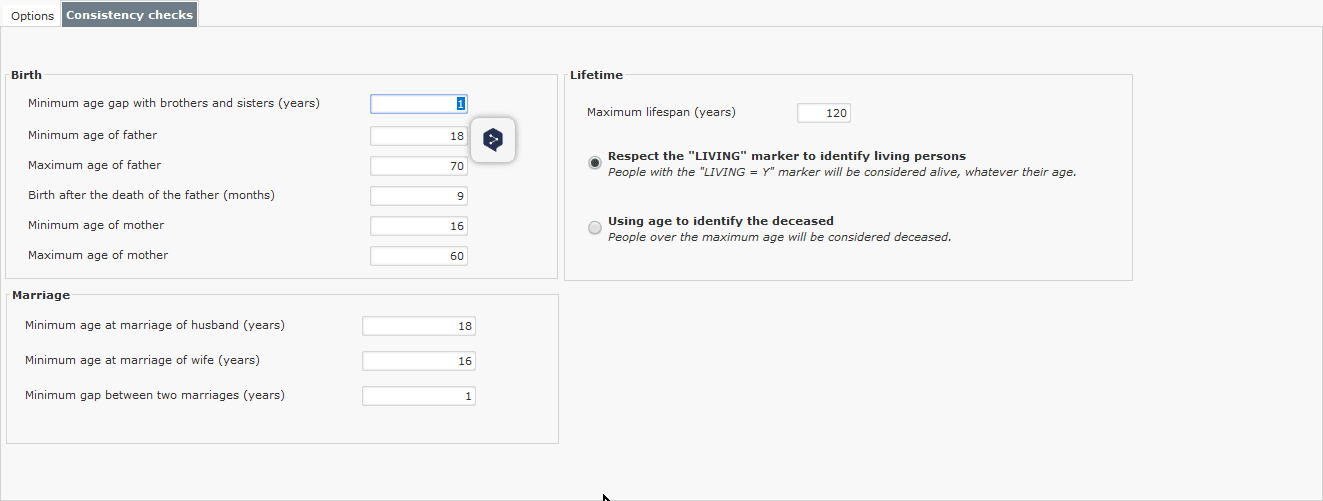
| Option | Possible values | Effects |
| Birth | Minimum age gap with siblings (years) | Ensures that births are at least one year apart. |
| Father’s minimum age | Checks whether the father has the minimum age indicated at the child’s birth. | |
| Father’s maximum age | Checks whether the father has the maximum age indicated at the child’s birth. | |
| Birth after father’s death (month) | If the father is deceased, this option ensures that the birth did not take place more than x months after the father’s death. | |
| Mother’s minimum age | Checks whether the mother has the minimum age indicated at the child’s birth. | |
| Mother’s maximum age | Checks whether the mother has the maximum age indicated at the child’s birth. | |
| Marriage | Husband’s minimum age at marriage (years) | Checks whether the husband has reached the minimum legal age at marriage. |
| Wife’s minimum age at marriage (years) | Enables you to check that the wife has reached the minimum legal age at marriage. | |
| Life expectancy | Maximum lifespan (years) | Checks that the individual has not exceeded a maximum age. Used to identify individuals who are deceased but not reported as such. |
| Respect the “_LIVING” marker to identify living individuals. | The application will always indicate the person as alive and will not check the consistency of the information. As a reminder, the “_LIVING” marker is entered in the genealogy application and transmitted in the GEDCOM file. | |
| Use age to identify deceased persons. | The application will indicate the age of the person calculated on the day of data analysis, and will indicate if this age exceeds the maximum age. People over this age will be considered deceased. |